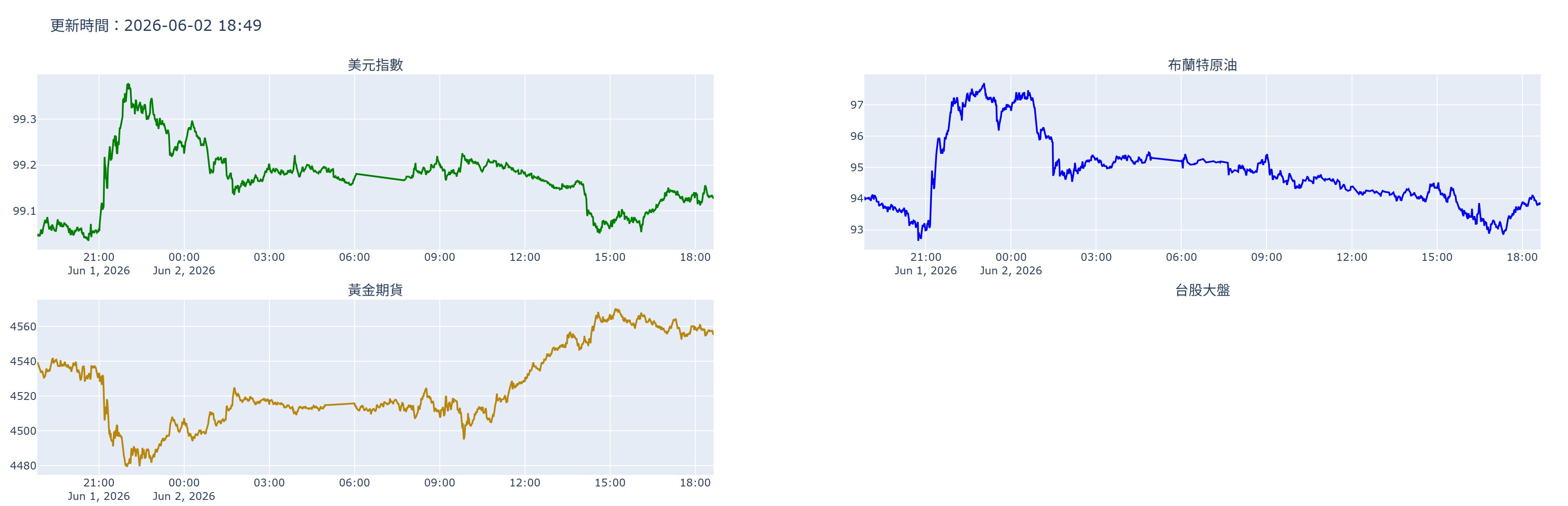
Dash 不是繪圖套件,而是一個使用 Flask Web 應用框架 + 事件驅動機制 + UI 容器。說的更白話,就是使用 Flask 製作一個網頁,此網頁會因時間觸發而更新裏面的內容,裏面的內容則是由 plotly 等繪圖軟体完成。
Flask 跟 Django 同等地位,都是網頁框架,Flask 屬輕量級的,功能比較陽春。
用途
這種用途就是股市的即時看盤,每秒或每分鐘更新一次。這套件 2017 年推出,被銀行業、証券公司廣泛使用。
官網網址如下 : https://dash.plotly.com/layout
安裝套件
本例需安裝如下套件
pip install dash pandas mysql-connector-python plotly
完整代碼
底下代碼可以每分鐘自動更新美元指標、布蘭特原油、黃金期貨的價格
import time
from datetime import datetime, timedelta

import dash
import yfinance as yf
import plotly.graph_objects as go
from plotly.subplots import make_subplots

from dash import dcc, html
from dash.dependencies import Input, Output
import pandas as pd
# Dash App
#app = Dash(__name__)
app = dash.Dash()
rows=3
cols=2
height=400
app.layout = html.Div([
    html.H2("美元指數 / 布蘭特原油 / 美債 / 黃金期貨"),

    dcc.Graph(
        id="chart",
        style={"height": "900px"}
    ),

    # 每分鐘更新一次
    dcc.Interval(
        id="interval-component",
        interval=60 * 1000,  # 毫秒
        n_intervals=0
    )
])

# 更新圖表
@app.callback(
    Output("chart", "figure"),
    Input("interval-component", "n_intervals")
)
def update_chart(n):
    names = ["美元指數", "布蘭特原油", "黃金期貨", "台股大盤","美債10年期殖利率"]
    tickers = ["DX-Y.NYB", "BZ=F", "GC=F","^TWII","^TNX"]
    colors = ["green", "blue", "#B8860B","brown","orange"]

    fig = make_subplots(
        rows=rows,
        cols=cols,
        subplot_titles=names,
        shared_xaxes=False,
        vertical_spacing=0.08,
        row_heights=[height]*rows,
    )

    for i, ticker in enumerate(tickers):
        current = datetime.now()
        if current.hour >= 14 and i == 3 or i == 4: continue
        row, col=divmod(i, 2)
        df = yf.download(
            ticker,
            period="5d",
            interval="1m",
            progress=False,
            auto_adjust=True
        )
        time.sleep(2)
        if len(df) == 0:continue

        # 移除 MultiIndex
        if hasattr(df.columns, "levels"):
            df.columns = df.columns.droplevel(1)

        # 轉台北時間
        if df.index.tz is not None:
            df.index = df.index.tz_convert("Asia/Taipei")

        current = pd.Timestamp.now(tz="Asia/Taipei")
        if i != 3:
            start = current - timedelta(days=1)
        else:
            year = current.year
            month = current.month
            day = current.day
            start = pd.Timestamp(year = year, month = month, day = day, hour = 9,minute = 0,second = 0, tz = "Asia/Taipei")
        df = df.query("index >= @start")

        print(df)

        fig.add_trace(
            go.Scatter(
                x = df.index,
                y = df["Close"],
                mode = "lines",
                name = names[i],
                line = dict(
                     color=colors[i],
                     width=2
                )
            ),
            row = row + 1,
            col = col + 1
        )
    fig.update_layout(
        height = height * rows,
        showlegend = False,
        hovermode = "x unified",
        #title=f"更新次數:{n}"
        title = f"更新時間:{datetime.now().strftime("%Y-%m-%d %H:%M")}",
    )
    fig.update_xaxes(matches='x')
    return fig

# 啟動
if __name__ == "__main__":
    app.run(
        host="0.0.0.0",
        port=8050,
        debug=True
    )
執行
執行時,只會啟動 Web Server,沒有任何結果,需於瀏覽器輸入如下網址查看
http://localhost:8085