
TeaPot
現在將介紹如何產生如下的視窗. 使用上下左右及滑鼠可以翻轉茶壺的角度
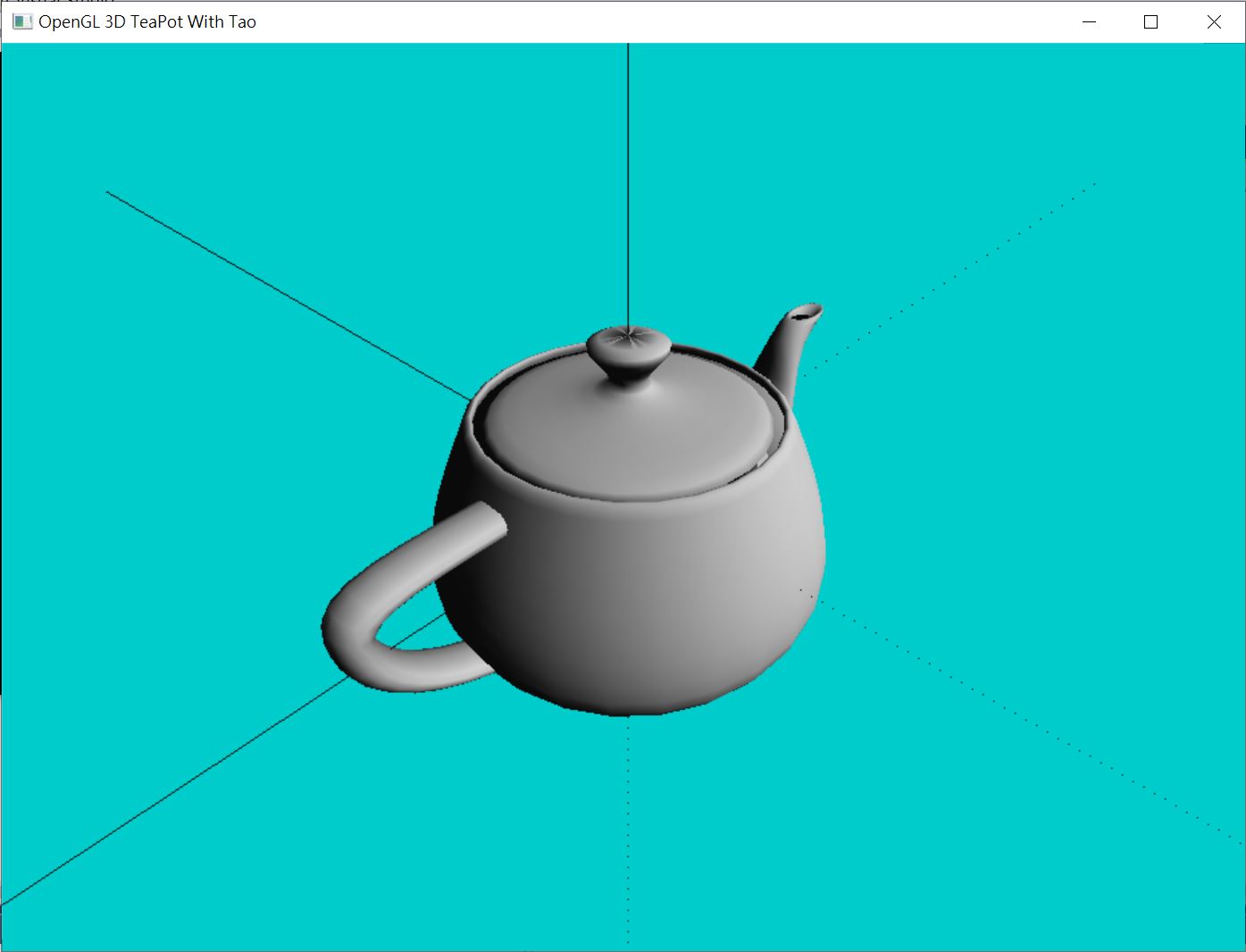
代碼如下
using System;
using System.Collections.Generic;
using System.Linq;
using System.Text;
using System.Threading.Tasks;
using Tao.FreeGlut;
using Tao.OpenGl;

namespace TeaPot
{
    class Program
    {
        static float d = 3f;
        static float X = 0.0f;// Translate screen to x direction (left or right)
        static float Y = 0.0f;// Translate screen to y direction (up or down)
        static float Z = 0.0f;// Translate screen to z direction (zoom in or out)
        static float rotX = 0.0f;// Rotate screen on x axis
        static float rotY = 0.0f;// Rotate screen on y axis
        static float rotZ = 0.0f;// Rotate screen on z axis
        static float rotLx = 0.0f;// Translate screen by using the glulookAt function (left or right)
        static float rotLy = 0.0f;// Translate screen by using the glulookAt function (up or down)
        static float rotLz = 0.0f;// Translate screen by using the glulookAt function (zoom in or out)
        static bool lines = true;// Display x,y,z lines (coordinate lines)
        static bool rotation = false;// Rotate if F2 is pressed
        static int old_x, old_y;// Used for mouse event
        static int mousePressed;

        static void drawings()
        {
            // Clear the Color Buffer and Depth Buffer
            Gl.glClear(Gl.GL_COLOR_BUFFER_BIT | Gl.GL_DEPTH_BUFFER_BIT);
            Gl.glPushMatrix();//push the Matrix before calling glRotatef and glTranslatef
            Gl.glRotatef(rotX, 1.0f, 0.0f, 0.0f);//Rotate on x
            Gl.glRotatef(rotY, 0.0f, 1.0f, 0.0f);//Rotate on y
            Gl.glRotatef(rotZ, 0.0f, 0.0f, 1.0f);//Rotate on z
            if (rotation)//If F2 is pressed update x,y,z for rotation of the teapot
            {
                rotX += 0.2f;
                rotY += 0.2f;
                rotZ += 0.2f;
            }
            Gl.glTranslatef(X, Y, Z);//Translates the screen left,right,up,down, and zoom
            if (lines)//If F1 is pressed don't draw the lines
            {
                // Draw the positive side of the lines x,y,z
                Gl.glBegin(Gl.GL_LINES);
                Gl.glColor3f(0.0f, 1.0f, 0.0f);                // Green for x axis
                Gl.glVertex3f(0f, 0f, 0f);
                Gl.glVertex3f(10f, 0f, 0f);
                Gl.glColor3f(1.0f, 0.0f, 0.0f);                // Red for y axis
                Gl.glVertex3f(0f, 0f, 0f);
                Gl.glVertex3f(0f, 10f, 0f);
                Gl.glColor3f(0.0f, 0.0f, 1.0f);                // Blue for z axis
                Gl.glVertex3f(0f, 0f, 0f);
                Gl.glVertex3f(0f, 0f, 10f);
                Gl.glEnd();

                // Dotted lines for the negative sides of x,y,z coordinates
                Gl.glEnable(Gl.GL_LINE_STIPPLE);//Enable dotted pattern lines
                Gl.glLineStipple(1, 0x0101);// Dotted stipple pattern for the lines
                Gl.glBegin(Gl.GL_LINES);
                Gl.glColor3f(0.0f, 1.0f, 0.0f);// Green for x axis
                Gl.glVertex3f(-10f, 0f, 0f);
                Gl.glVertex3f(0f, 0f, 0f);
                Gl.glColor3f(1.0f, 0.0f, 0.0f);// Red for y axis
                Gl.glVertex3f(0f, 0f, 0f);
                Gl.glVertex3f(0f, -10f, 0f);
                Gl.glColor3f(0.0f, 0.0f, 1.0f);// Blue for z axis
                Gl.glVertex3f(0f, 0f, 0f);
                Gl.glVertex3f(0f, 0f, -10f);
                Gl.glEnd();
            }
            Glu.gluLookAt(0, 0, 0, 0, 0, 1, 0, 1, 0);
            Glut.glutSolidTeapot(1);

            Gl.glDisable(Gl.GL_LINE_STIPPLE);//Disable the line stipple
            Glut.glutPostRedisplay();//Redraw the scene
            Gl.glPopMatrix();//Don't forget to pop the Matrix
            Glut.glutSwapBuffers();
        }
        static void init()
        {
            Gl.glShadeModel(Gl.GL_SMOOTH);//Set the shading model to smooth
            //Clear the Color and Depth Buffer
            Gl.glClear(Gl.GL_COLOR_BUFFER_BIT | Gl.GL_DEPTH_BUFFER_BIT);
            Gl.glEnable(Gl.GL_LIGHTING);
            Gl.glEnable(Gl.GL_LIGHT0);
            float[] light_pos = new float[3] { 1, 0.5F, 1 };
            Gl.glLightfv(Gl.GL_LIGHT0, Gl.GL_POSITION, light_pos);
            Gl.glClearDepth(1.0f);//Set the Depth buffer value (ranges[0,1])
            Gl.glEnable(Gl.GL_DEPTH_TEST);//Enable Depth test
            Gl.glDepthFunc(Gl.GL_LEQUAL);//If two objects on the same coordinate show the first drawn
            Gl.glClearColor(0, 0.8f, 0.8f, 1);
            Gl.glHint(Gl.GL_PERSPECTIVE_CORRECTION_HINT, Gl.GL_NICEST);
        }
        static void reshape(int w, int h)
        {
            Gl.glViewport(0, 0, w, h);//Set the viewport
            Gl.glMatrixMode(Gl.GL_PROJECTION);//Set the Matrix mode
            Gl.glLoadIdentity();
            Glu.gluPerspective(75f, (float)w / (float)h, 0.10f, 500.0f);
            Gl.glMatrixMode(Gl.GL_MODELVIEW);
            Gl.glLoadIdentity();
            Glu.gluLookAt(rotLx, rotLy, d +
                     rotLz, 0.0f, 0.0f, 0.0f, 0.0f, 1.0f, 0.0f);
        }
        public static void keyboard(byte key, int x, int y)
        {
            switch (key)
            {
                case 111://o Resets all parameters
                case 80://O
                    rotation = false;
                    X = Y = 0.0f;
                    Z = 0.0f;
                    rotX = 0.0f;
                    rotY = 0.0f;
                    rotZ = 0.0f;
                    rotLx = 0.0f;
                    rotLy = 0.0f;
                    rotLz = 0.0f;
                    Gl.glMatrixMode(Gl.GL_MODELVIEW);
                    Gl.glLoadIdentity();
                    Glu.gluLookAt(rotLx, rotLy, d + rotLz,
                        0.0f, 0.0f, 0.0f, 0.0f, 1.0f, 0.0f);
                    break;
            }
            Glut.glutPostRedisplay();// Redraw the scene
        }
        private static void specialKey(int key, int x, int y)
        {
            switch (key)
            {
                case Glut.GLUT_KEY_LEFT://Rotate on y axis
                    rotY -= 2.0f;
                    break;
                case Glut.GLUT_KEY_RIGHT://Rotate on y axis
                    rotY += 2.0f;
                    break;
                case Glut.GLUT_KEY_UP://Rotate on x axis
                    rotX -= 2.0f;
                    break;
                case Glut.GLUT_KEY_DOWN://Rotate on x axis
                    rotX += 2.0f;
                    break;
                case Glut.GLUT_KEY_PAGE_UP://Rotate on z axis
                    rotZ -= 2.0f;
                    break;
                case Glut.GLUT_KEY_PAGE_DOWN://Rotate on z axis
                    rotZ += 2.0f;
                    break;
                case Glut.GLUT_KEY_F1://Enable/Disable coordinate lines
                    lines = !lines;
                    break;
                case Glut.GLUT_KEY_F2://Enable/Disable automatic rotation
                    rotation = !rotation;
                    break;
                default:
                    break;
            }
            Glut.glutPostRedisplay();
        }

        static void processMouseActiveMotion(int button, int state, int x, int y)
        {
            mousePressed = button;//Capture which mouse button is down
            old_x = x;//Capture the x value
            old_y = y;//Capture the y value
        }
        static void processMouse(int x, int y)
        {
            if ((mousePressed == 0))//If left mouse button is pressed
            {
                rotY = (x - old_x);
                rotX = (y - old_y);
            }
            Glut.glutPostRedisplay();
        }

        static void processMouseWheel(int wheel, int direction, int x, int y)
        {

            Z += direction;
            Glut.glutPostRedisplay();
        }

        static void Main(string[] args)
        {
            Glut.glutInit();// Initialize glut
            // Setup display mode to double buffer and RGB color
            Glut.glutInitDisplayMode(Glut.GLUT_DOUBLE | Glut.GLUT_RGB);
            // Set the screen size
            Glut.glutInitWindowSize(1024, 768);
            Glut.glutCreateWindow("OpenGL 3D TeaPot With Tao");
            init();
            Glut.glutReshapeFunc(reshape);
            Glut.glutDisplayFunc(drawings);
            // Set window's key callback
            Glut.glutKeyboardFunc(new Glut.KeyboardCallback(keyboard));
            // Set window's to specialKey callback
            Glut.glutSpecialFunc(new Glut.SpecialCallback(specialKey));
            // Set window's to Mouse callback
            Glut.glutMouseFunc(new Glut.MouseCallback(processMouseActiveMotion));
            // Set window's to motion callback
            Glut.glutMotionFunc(new Glut.MotionCallback(processMouse));
            // Set window's to mouse motion callback
            Glut.glutMouseWheelFunc(new Glut.MouseWheelCallback(processMouseWheel));
            Glut.glutMainLoop();
        }
    }
}