
安裝套件
本篇一維條碼使用python-barcode套件的原因, 是因在Windows及Linux皆可運作.
想產生一維條碼 barcode圖像, 需安裝python-barcode, 但安裝此套件前, 需先安裝 Pillow及pathlib
sudo pip3 install Pillow pathlib python-barcode
執行結果
下述圖案經手機或條碼機掃碼, 其結果應該為 5. 如果掃不出來或是結果不正確的話, 那本篇應該是在鬼畫符了.
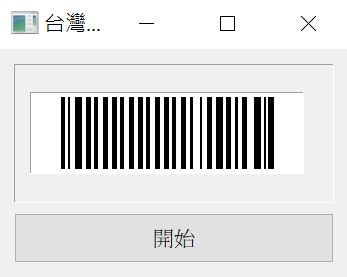
流程
代碼運作流程如下

import io
import sys
import barcode
from PyQt5.QtGui import QPixmap
from PyQt5.QtWidgets import QMainWindow, QApplication
from ui.ui_barcode import Ui_MainWindow
class MainWindow(QMainWindow, Ui_MainWindow):
    def getBarcodePixmap(self, strNo):
        imgByte = io.BytesIO()
        pixmap = QPixmap()
        barcodeClass = barcode.get_barcode_class('code128')
        barcodeWriter=barcode.writer.ImageWriter()
        barcodeObject = barcodeClass(strNo, writer=barcodeWriter)
        #barcodeObject.save('tmp', options={'write_text': False})
        barcodeObject.write(imgByte, options={'write_text': False})
        imgByte.seek(0)
        pixmap.loadFromData(imgByte.read())
        return pixmap
    def __init__(self, parent=None):
        super(MainWindow, self).__init__(parent)
        self.setupUi(self)
        strNo='5'.zfill(10)
        pix=self.getBarcodePixmap(strNo)
        pix = pix.scaled(pix.width(), 80)
        self.label.setPixmap(pix)
if __name__ == "__main__":
    app = QApplication(sys.argv)
    mainwindow = MainWindow()
    mainwindow.showMaximized()
    app.exec()
options
options的內容, 是本人在原始碥 venv\Lib\site-packages\barcode所查的結果
由底下的代碼可知, 若不想印出文字, 則需設定 options={‘write_text’: False}
若想印出自訂文字, 則需設定options={‘text’: ‘要顯示的文字’}
    def render(self, writer_options=None, text=None):
        """Renders the barcode using `self.writer`.

        :parameters:
            writer_options : Dict
                Options for `self.writer`, see writer docs for details.
            text : str
                Text to render under the barcode.

        :returns: Output of the writers render method.
        """
        options = Barcode.default_writer_options.copy()
        options.update(writer_options or {})
        if options["write_text"] or text is not None:
            if text is not None:
                options["text"] = text
            else:
                options["text"] = self.get_fullcode()
        self.writer.set_options(options)
        code = self.build()
        raw = self.writer.render(code)
        return raw
地雷
barcode若有印出文字, 在 .py檔執行都沒問題. 但若一但包裝成 .exe檔, 就會出現 cannont open resource的錯誤. 此為文字字型錯誤.
目前大部份的網站都說明只要設定字型目錄即可解決. 但實際上, 都是沒有用的.
底下紅色部份, 就是網路上錯誤的教學. 完全無用
def getBarcode(no):
    if platform.system() == "Windows":
        barcode.writer.FONT = os.path.join('c:\\windows\\fonts','simsun.ttc')
    code = barcode.get_barcode_class('code128')
    bar = code(no, writer=barcode.writer.ImageWriter())
    imgByte = io.BytesIO()
    bar.save('tmp')
為了避開 pyinstaller包裝成 .exe檔後的錯誤, 本人就不在barcode圖片上顯示文字了.