
本篇是 Java I/O Fundamentals 的基本觀念。
目的
- Java 基本輸入輸出
- 自主控台讀取及寫入資料
- stream 讀取及寫入檔案
- serialization 讀取寫入物件
Java 基本I /O
Java提供龐大的函數庫執行 I/O 功能,將 I/O channel 定義為串流(stream)。串流可以代表不同的來源及目的,包含磁碟檔案、裝置、其他程式、記憶体陣列。串流也支援不同種類的資料,如 bytes、原生資料型態、 字元和物件。
I/O 串流
程式使用輸入串流從來源地讀取資料,使用輸出串流將資料寫出,不需理會串流裏面是如何運作的,只需注意簡單的使用方法。串流取得的資料是有順序性。
資料來源串流 (Data source stream) 初始化資料流,稱 InputStream 或 Reader,資料終端串流 (Data sink stream) 終止資料流稱為 OutputStream 或 Writer,Sources 及 sink 是串流的二個節點。

家裏要用水就要接水管,要用瓦斯就要接瓦斯管。在串流內流動的資料分二種,一種為 byte,另一種為char。傳輸 byte 時的管子叫 InputStream/OutputStream,傳輸 char 時的管子叫 Reader/Writer。
byte stream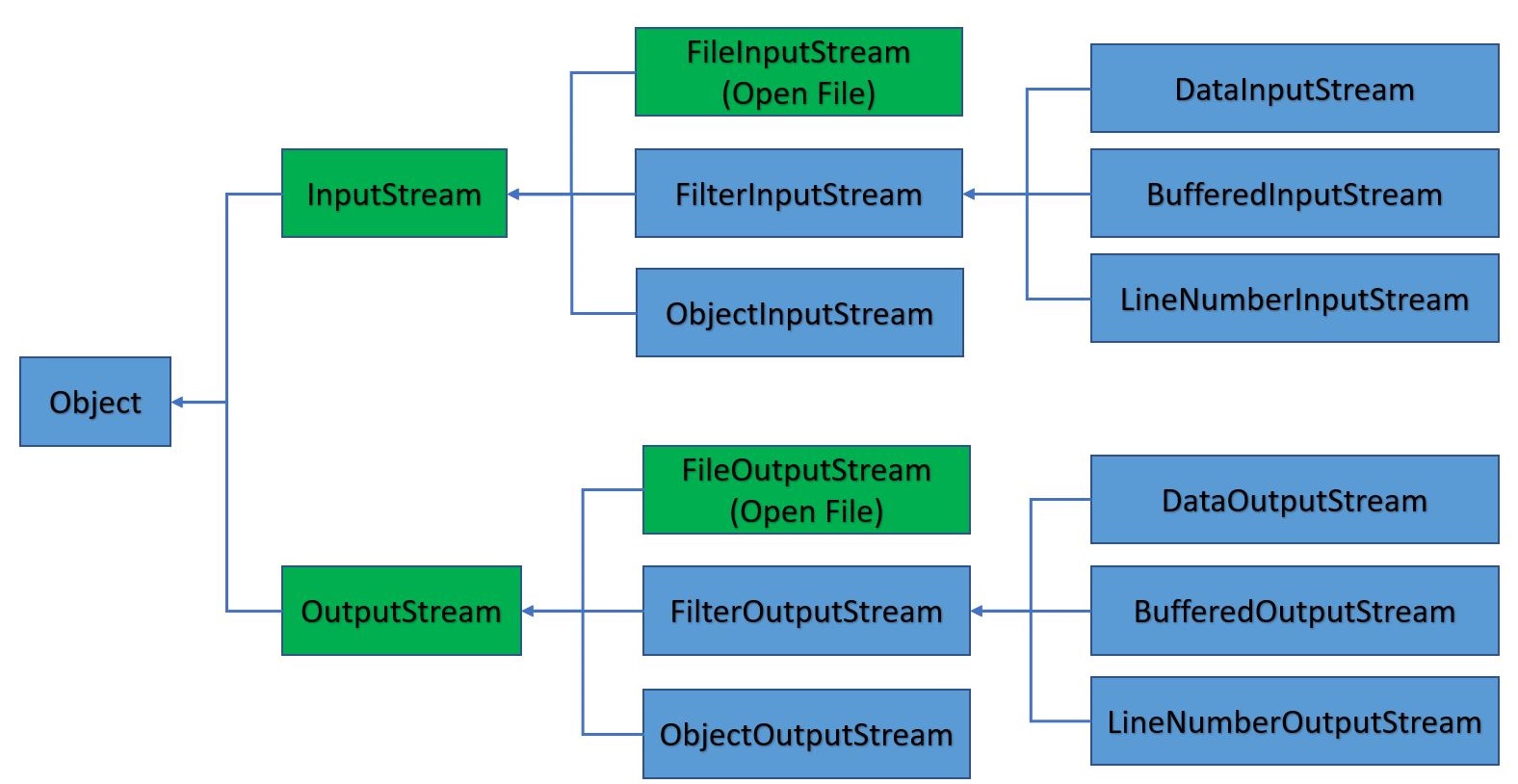
char stream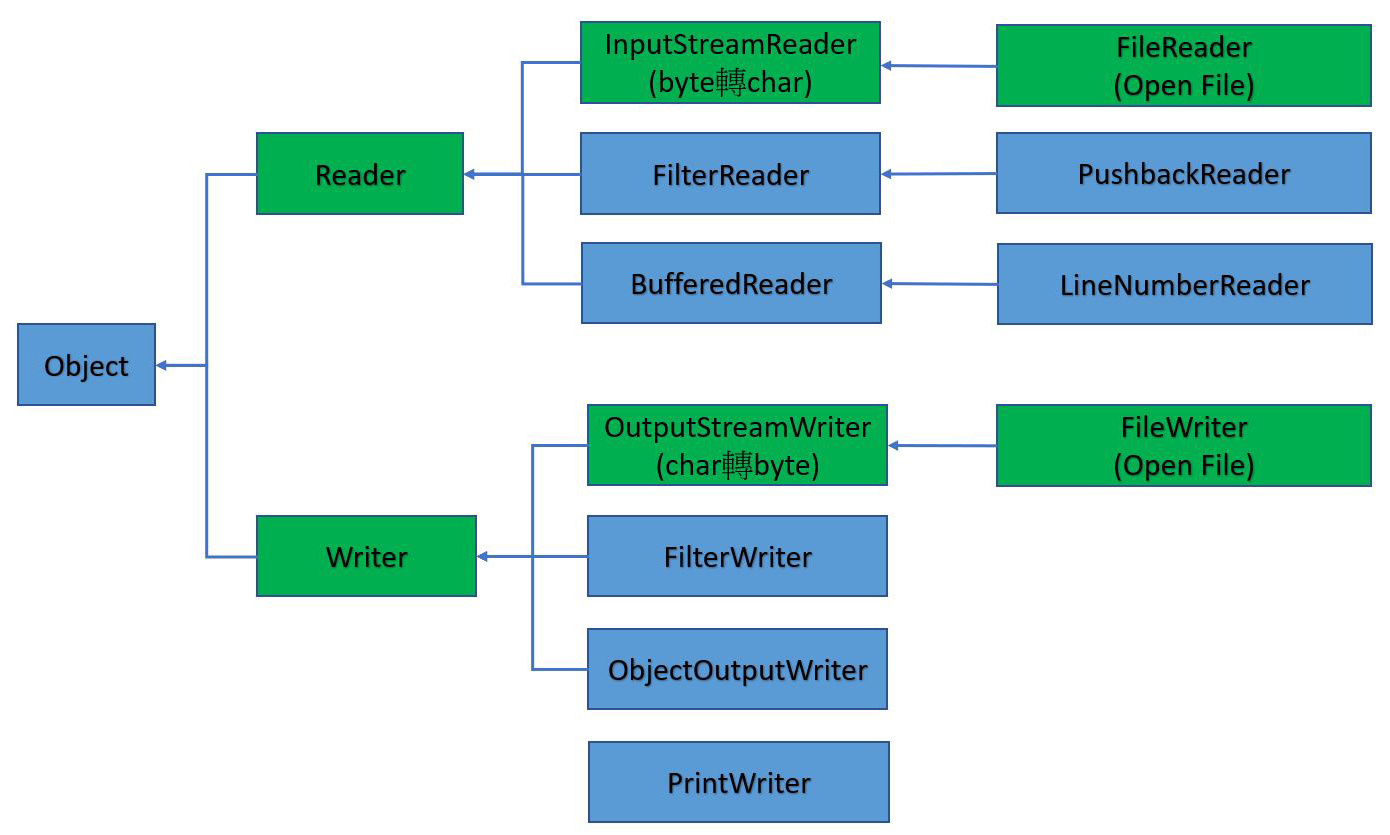
InputStream
InputStream 以 read() 讀取單一 byte 資料或一連串 byte
int read() : 傳回讀取到的 byte 資料, 或 -1 代表結束
read(byte[] b) : 讀取資料到b中, 並傳回讀取的byte 數
read(byte[] b, int off, int len) : 指定要放入buffer的位置及長度
特別注意 Java SE7 使用 AutoCloseable 實作 InputStream, 也就是在 try-catch 內使用 InputStream 會自動關閉串流。
其他方法包含
void close()
int available() : 回報可讀取的長度(byte)
long skip(long n) : 放棄讀取 n byte的串流資料
boolean markSupported() : 若串流有支援mark()及reset(), 則返回true
void mark(int readlimit) : 標註可重讀的地方, 再用reset()回標註點重讀
void reset() : 若沒有mark(), 則reset()無作用
OutputStream
OutputStream以write()寫入一 byte 資料或一連串 byte
write(int b)
write(byte[] b)
write(byte[] b, int off, int len)
其他方法
void close()
void flush()
Reader
int read() : 返回讀到的Unicode 字元, 或 -1代表結束
read(char[] buff)
read(char[] buff, int off, int len)
其他方法
void close()
boolean ready()
long skip(long n)
boolean markSupported()
void mark(int readAheadLimit)
void reset()
Writer
write(int c)
write(char buff)
write(String str)
write(char[] buff, int off, int len)
write(String str, int off, int len)
其他方法
void close()
void flush()
FileInputStream/FileOutputStream
繼承 InputStream/OutputStream,傳輸 byte 資料。開啟檔案若不存在,會自動建立檔案。
FileOutputStream(File file, boolean append) ,若 append 為 true,表示要將資料寫入原始檔案中即有資料之後。若為 false,則會清除原始的檔案重新寫入。
🔒 完整內容請註冊並登入會員。
免費註冊登入BufferedInputStream/BufferedOutputStream
FileInputStream 直接對檔案做 I/O,小量資料讀取時效能非常差。
BufferedInputStream 是在 FileInputStream 前面加上記憶体緩衝區,預設每次從硬碟讀取 8192 byte 資料存入記憶体中。
bos.read() 由記憶体中讀取一個 byte 資料,因為是由記憶体中讀取,效能非常高。
BufferedInputStream 一定要傳入 FileInputStream 參數。
BufferedInputStream bis=new BufferedInputStream(new FileInputStream("檔名"));
若要更改預設的 8192 bytes,則可以使用如下語法
BufferedInputStream bis=new BufferedInputStream(new FileInputStream("檔名"), 10240);
完整代碼如下
public static void main(String[] args) {
    os.utf8();
    int data;
    try(BufferedInputStream bis=new BufferedInputStream(new FileInputStream("f:/tmp/a.jpg"));
        BufferedOutputStream bos=new BufferedOutputStream(new FileOutputStream("f:/tmp/b.jpg"));
        ){
        while((data=bis.read())!=-1){
            bos.write(data);
        }
    }
    catch(IOException e){}
}
FileReader/FileWriter
FileReader/FileWriter 分別是 InputStreamReader/OutputStreamWriter 的子類別,而這二個又是Reader/Writer的子類別。
可用於傳輸char資料
🔒 完整內容請註冊並登入會員。
免費註冊登入以上只能讀取 utf-8 之中文檔,若是 unicode,則會出現亂碼。
Processing Streams
自來水跟瓦斯好比是資料流的byte, char. 家裏不是只有水管(inputStream)而以, 還有水塔(BufferedInputStream), 化糞池(BufferedOutputStream), 瀘水器(FilterInputStream), 分歧器(三向接頭, DataInputStream), 臉盆(PrintStream), 瓦斯爐PrintWriter)
程式中暫存或資料處理的Stream物件.
| Functionality | Character Streams | Byte Streams |
| Buffering(Strings) | BufferedReader BufferedWriter |
BufferedInputStream BufferedOutputStream |
| Filtering | FilterReader FilterWriter |
FilterInputStream FilterOutputStream |
| Conversion(byte to character) | InputStreamReader OutputStreamWriter |
|
| Object serialization | ObjectInputStream ObjectOutputStream |
|
| Data conversion | DataInputStream DataOutputStream |
|
| Counting | LineNumberReader | LineNumberInputStream |
| Peeking ahead | PushbackReader | PushbackInputStream |
| Printing | PrintWriter | printStream |
在上面的表中, Filtering比較特殊, 其建構子都是protected的. 也就是說在其他的package中, 除非繼承Filtering, 否則不能new 出物件.
為什麼要這麼作呢, 因為Filtering是給Java SE系統開發其他類別用的.
InputStream<–FilterInputStream<–DataInputStream/BufferedInputStream
OutputStream<–FilterOutputStream<–DataOutputStream/BufferedInputStream/PrintStream
Reader<–FilterReader<–PushbackReader
Writer<–FilterWriter
DataInput/DataOut介面
DataInputStream繼承了FilterInputStream, 也實作了DataInput介面可以讀取不同的資料, 比如readByte(), readChar(), readDouble(), readFloat(), readInt(), readLong(), readShort()
DataOutputStream同上
資料串流鏈結-I/O Stream Chaining
將水管, 水塔, 瀘水器等連接起來, 生活用水才會便利, 對吧. 如果家裏沒裝水塔, 那停水了不就不用洗澡了嗎
為了高效能及彈性, 資料流也必需串連起來.
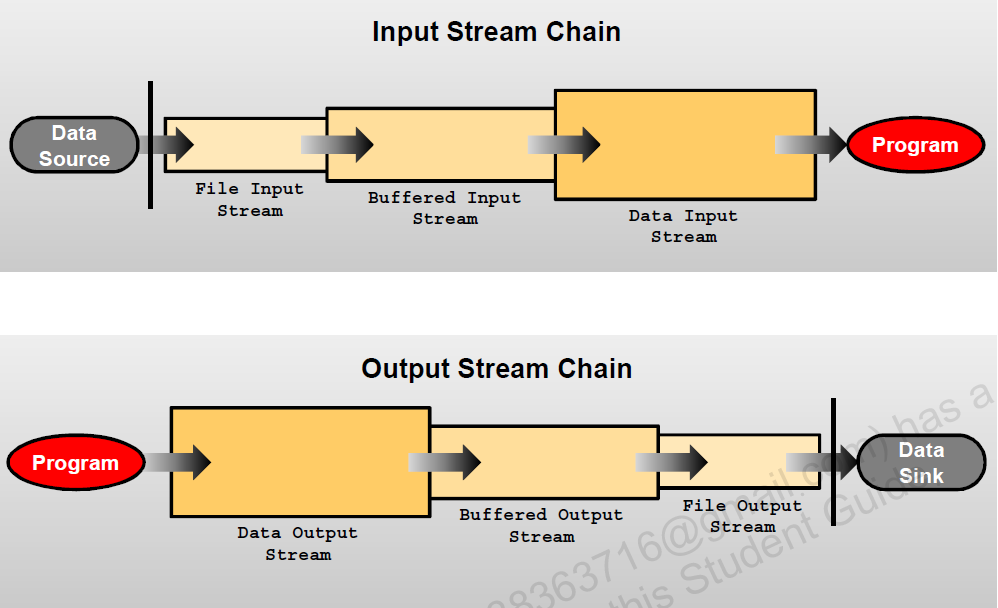
上面第一個圖, 先使用FileStream開啟檔案, 再傳入buffer Stream增快效能, 再用DataInputStream轉成資料
BufferReader/BufferWriter
要取水, 直跟跟水塔要比較快也比較方便. 所以針對BufferedReader/BufferedWriter下執讀寫, 是最有效率的.
當然, 也有BufferedInputStream/BufferedOutputStream
另外, 關閉檔案, 也請以Buffered的close 為主. 使用FileReader的close, 會造成錯誤
🔒 完整內容請註冊並登入會員。
免費註冊登入上述使用BufferedReader連結FileReader, 再由BufferedReader使用readLine()傳入String物件中
InputStreamReader/OutputStreamWriter
這二個是作資料的轉換
InputStreamReader : byte 轉char
OutputStreamWriter : char 轉 byte
建構子為
new InputStreamReader(InputStream, “ISO8859_1”);
new OutputStreamWriter(OutputStream, “ISO8859_1”);
FileReader/FileWriter即為這二個的子類別
Console I/O
java.lang package中的System 類別, 有三個static fields : out, in, err.
System.in : 指向InputStream物件, 用於讀取標準輸入, 通常指向鍵盤
System.out : 指向PrintStream物件, 用於寫入標準輸出, 通常指向螢幕
System.err : 指向PrintStream物件, 用於寫入標準錯誤, 通常指向螢幕, 用於輸出錯誤訊息
通常使用InputStreamReader(System.in)建立一條通道, 再將此通道放入BufferedReader()之中即可
🔒 完整內容請註冊並登入會員。
免費註冊登入上述使用InputStreamReader將System.in的byte轉成char, 再使用PrintWriter印出
java.io.Console
System類別也可以存取java.io.Console物件, 如下例
public class ConsoleTest {
    public static void main(String[] args) {
        Console cons=System.console();
        if(cons!=null){
            String userName, pwd;
            while(true){
                userName=cons.readLine("%s", "User name : ");
                if(userName.equals("exit"))break;
                pwd=new String(cons.readPassword("%s", "Password : "));
                System.out.printf("User Name : %s, Password : %s\n", userName, pwd);
            }
        }
    }
}
因為NetBeans沒有Console, 所以上述程式無法在NetBeans內執行, 需使用命令列才能執行
Channel I/O
FileChannel是將整個檔案一次讀進跟寫出的機制, 在Java 1.4就己出現. 使用方法為
利用FileInputStream().getChannel()方法, 產生FileChannel的物件.
整備一大塊的buffer : ByteBuffer buff=ByteBuffer.allocate(size)
然後再用FileChannel的物件方法read(buff), 讀入buff裏
🔒 完整內容請註冊並登入會員。
免費註冊登入以上可以讀取UniCode的檔案, 不過檔案如果太大, 可能就會讀到掛掉吧
持久化(Persistence)
把資料存在永久的裝置叫Persistence, 如硬碟. 物件是可以使用 persistence的, 非persistence物件只存在runtime時期. 序列化(serialization是Java的標準機制, 可以有順序的使用 byte在儲存, 並於之後重建複制物件. 要達此目的, 類別需implement java.io.Serializable介面
序列化及物件(Serialization and Object Graphs)
當物件序列化, 只保留fields, 若fields參考一個物件, 則此物件也必需是序列化
Transient Fields and Objects
當類別implement Serializable介面後,裏面的Fields都是可以被ObjectOutputStream存在硬碟的檔案裏的. 若此時某個Field不想被儲存時(如password), 就可以在此Field前加上transient
public class TransientTest implements Serializable{
    public transient FileInputStream inputFile;
    public static int BASE=100; //static field是不能被序列化的
    private transient int totalValue=10;
    protected Stock[] stocks;//Stock也必需被序列化
}
Fields的存取修飾子不影響序列化
static fields的變數不能序列化
區域變數不能被序列化
方法也不能被序列化
Serial Version UID
序列化時, 可以使用 private static final long serialVersionUID = 8294180014912103005L 來作核對, 當解序列化時, 若Serial Version UID不對, 就會產生InvalidClassException
若沒宣告serial version UID, 則於執行時期, 系統會自動產生, 但建議要自己宣告
🔒 完整內容請註冊並登入會員。
免費註冊登入序列化方法(Serialization Methods)
當序列化物件要寫入時, writeObject()方法會被執行, 若沒有此方法, 則會執行defaultWriteObject().
當物件被解序列化時(就是被讀入時), readObject()方法就會被執行, 沒此方法就會執行defaultReadObject()
這些方法, 都是private